


• Home
  • Documentation
    • Getting Started
    • Profiles
    • AML
    • Identity
    • EDD
    • KYB
    • Right to Rent
    • Right to Work
    • Proof of Ownership
    • Source of Funds
  • Home
  • Documentation
    • Getting Started
    • Profiles
    • AML
    • Identity
    • EDD
    • KYB
    • Right to Rent
    • Right to Work
    • Proof of Ownership
    • Source of Funds
Compliability App
  • Banner shape
  • Banner shape
  • Banner shape
  • Banner object
  • Banner object
  • Banner object
  • Banner object
  • Banner object
  • Banner object
  • Banner object

Compliability Knowledge Base

loading
  1. Home
  2. Docs
  3. Compliability Documentation
  4. Getting Started
  5. Online Registration Guide
Updated on 18 January 2026
Compliability Documentation
  • Folder icon closed Folder open iconCompliability Documentation
    • Getting Started
      • Introduction to the Platform
      • Online Registration Guide
      • Selecting the Appropriate Subscription Plan
    • Profiles
      • Creating a New Company Profile
      • Creating a New Individual Profile
      • Guide to the Company Profile Page
      • Guide to the Individual Profile Page
    • AML
      • How to run an AML check on a Company?
      • How to run an AML check on an Individual?
      • Review a Company AML check?
      • Review an Individual AML
      • How to set Status & Risk on an AML check?
      • How to reconcile hits on an AML check?
    • Identity
      • How to run an Identity IDv check
      • Review and assess an IDv check
    • EDD
      • How to run an Enhanced Due Diligence EDD check
      • Review and assess an EDD check
    • KYB
      • How to run a Know Your Business KYB check
      • Review and assess a KYB check
    • Right to Rent
      • How to run a Right to Rent check
      • Review and assess a Right to Rent check
    • Right to Work
      • How to run a Right to Work check
      • Review and assess a Right to Work check
    • Proof of Ownership
      • How to run a Proof of Ownership check
      • Review and assess a Proof of Ownership check
    • Source of Funds
      • How to run a Source of Funds check
      • Review and assess a Source of Funds check
    • Credits
      • Manage and use credits within the app
    • FAQs

Online Registration Guide

Estimated reading: 1 minute 26 views

Follow a step-by-step walkthrough on how to create your account, verify your details, and get set up on the platform for the first time.

Step 1

Begin your journey on Compliability by accessing your dashboard. From there, navigate to the option labeled “Start New Journey.”
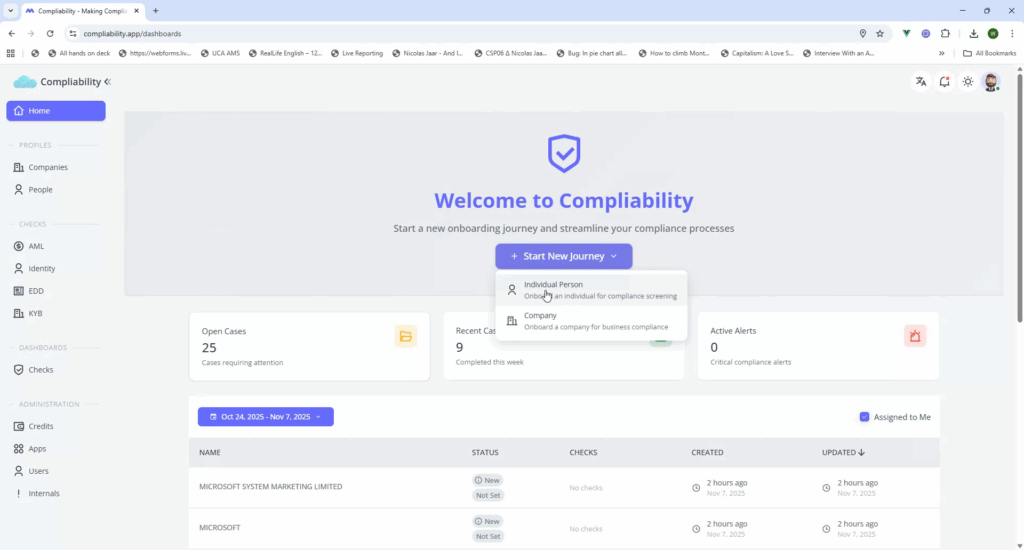
Step 2

Proceed by selecting “Individual Person.” You will be required to input basic information such as the title, first name, and last name.
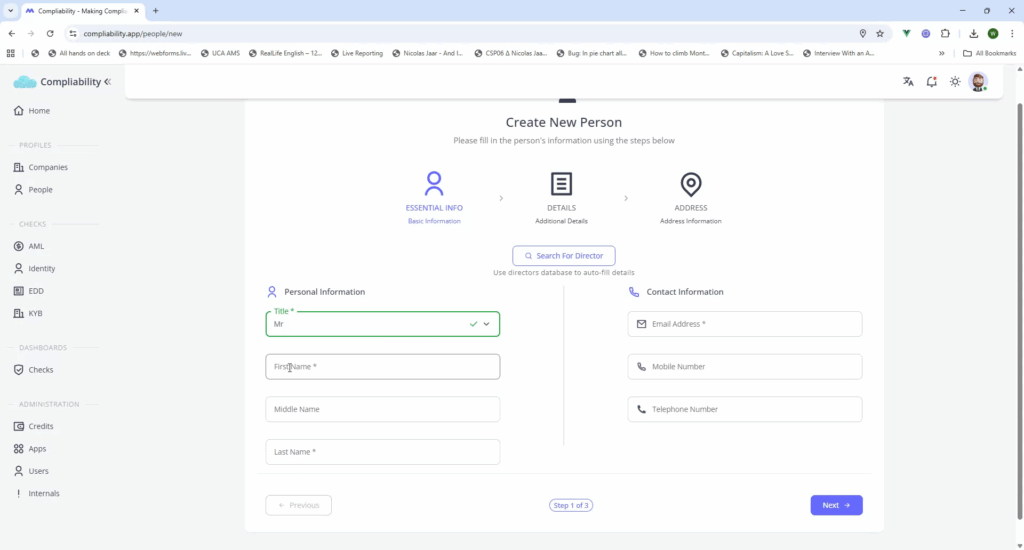
Step 3

Enter additional details including telephone numbers and any other optional information. Then, click on “Next.” Be sure to include the date of birth.
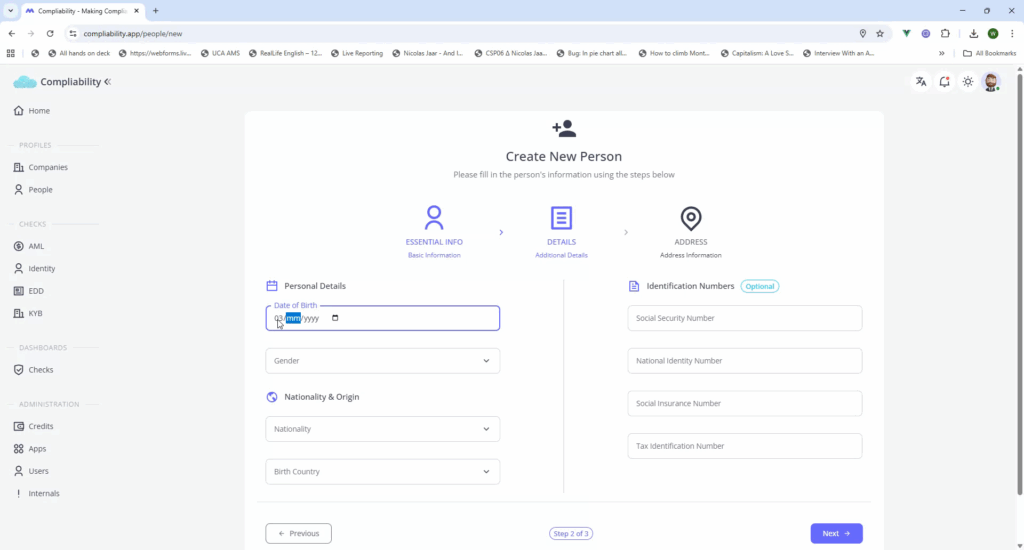
Step 4

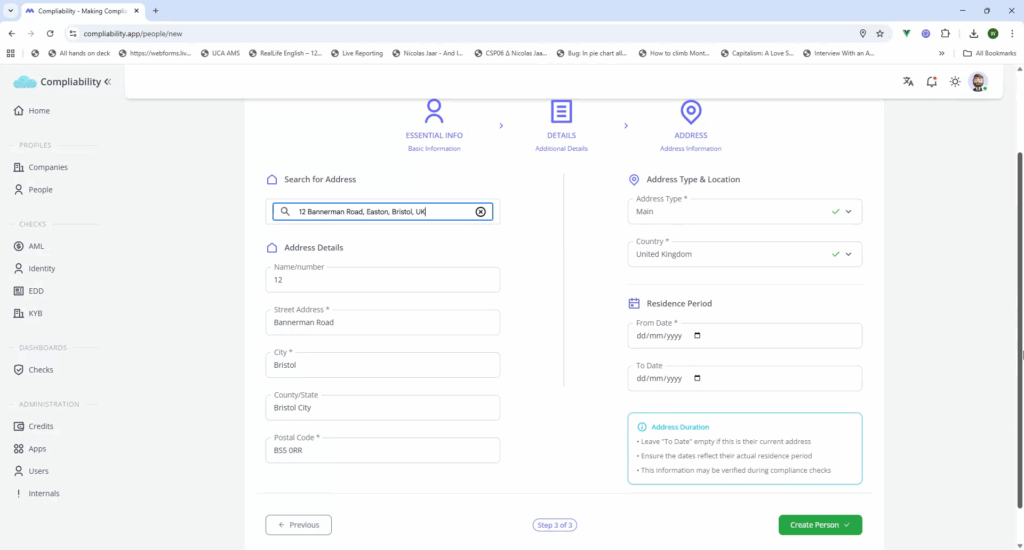
Further, provide information on gender and nationality. Utilize the “Search for address” function to add address details. Include any additional optional information as needed.
Step 5

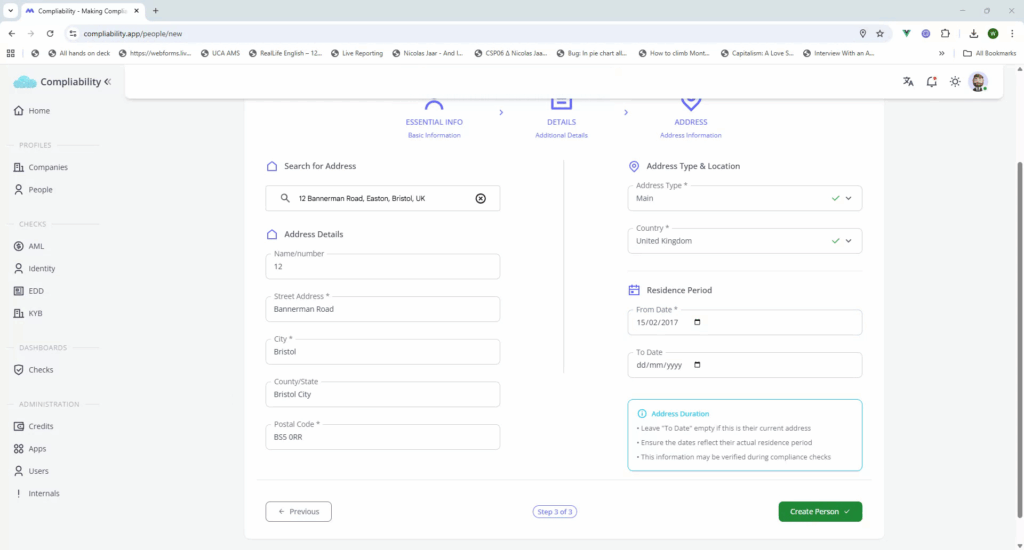
Conclude by entering the residence start date. Upon completion, your individual profile is successfully created.
Recently Viewed articles

  • Compliability Documentation
  • See More

Powered By EazyDocs